“Which one should I pay for?” It’s the question we hear most from growers, crop consultants and farm office staff. ChatGPT, Claude, Gemini, Copilot, Grok, Meta AI: each claims to be the smartest, and each has a free plan, a paid plan and a pricier one again.
Here’s the honest answer. For most farm-office work, the gap between the top apps is now smaller than the gap between using any one of them well and not using it at all. So the best AI for you usually isn’t the one at the top of this month’s leaderboard. It’s the one that fits your work, sits next to your files and handles what you’ll share with it.
That’s still a lot to weigh, so we built a shortcut. Answer five questions below and you’ll get an app, a plan and a model to start with, plus a second option. Then we’ll unpack the thinking behind it, so you can make the call yourself next time the line-up changes.
The short version
- An app, a plan and a model are three different things. The app is what you open, the plan sets your limits, and the model is what actually answers.
- Every major app crossed the “good enough” line for everyday work in 2024. Today the top models sit close together.
- So choose on fit: the type of work, where your files live, what you’ll share and what you’ll pay.
- Turn on thinking mode for hard jobs. That’s where models still differ, and where the top plans earn their price.
- Test before you commit. A week of your own real tasks beats any ranking, ours included.
Find your AI setup in five taps
The picker asks about the work, not about you. There’s no question on your role and nothing about technical specs. Your answers decide three things: how much horsepower the work needs, which app sits closest to your files, and whether you need business-grade privacy.
This is a simple rule of thumb, not a ranking. It can’t know how a model handles your crop plan, your client reports or your spreadsheets. Treat the result as the first app to test, not the final answer.
Then test it on your own work
The most reliable way to choose is a short trial on the jobs you actually do. Most apps have a free plan, and paid plans can be cancelled monthly, so a week of testing costs little.
Before you run the test, it helps to know what you’re actually comparing. Most of the confusion comes from three words that sound like one thing.
App, plan, model: three different things
When someone says “I use ChatGPT,” they’re naming an app. But that sentence leaves out two other layers that decide the answer they got.
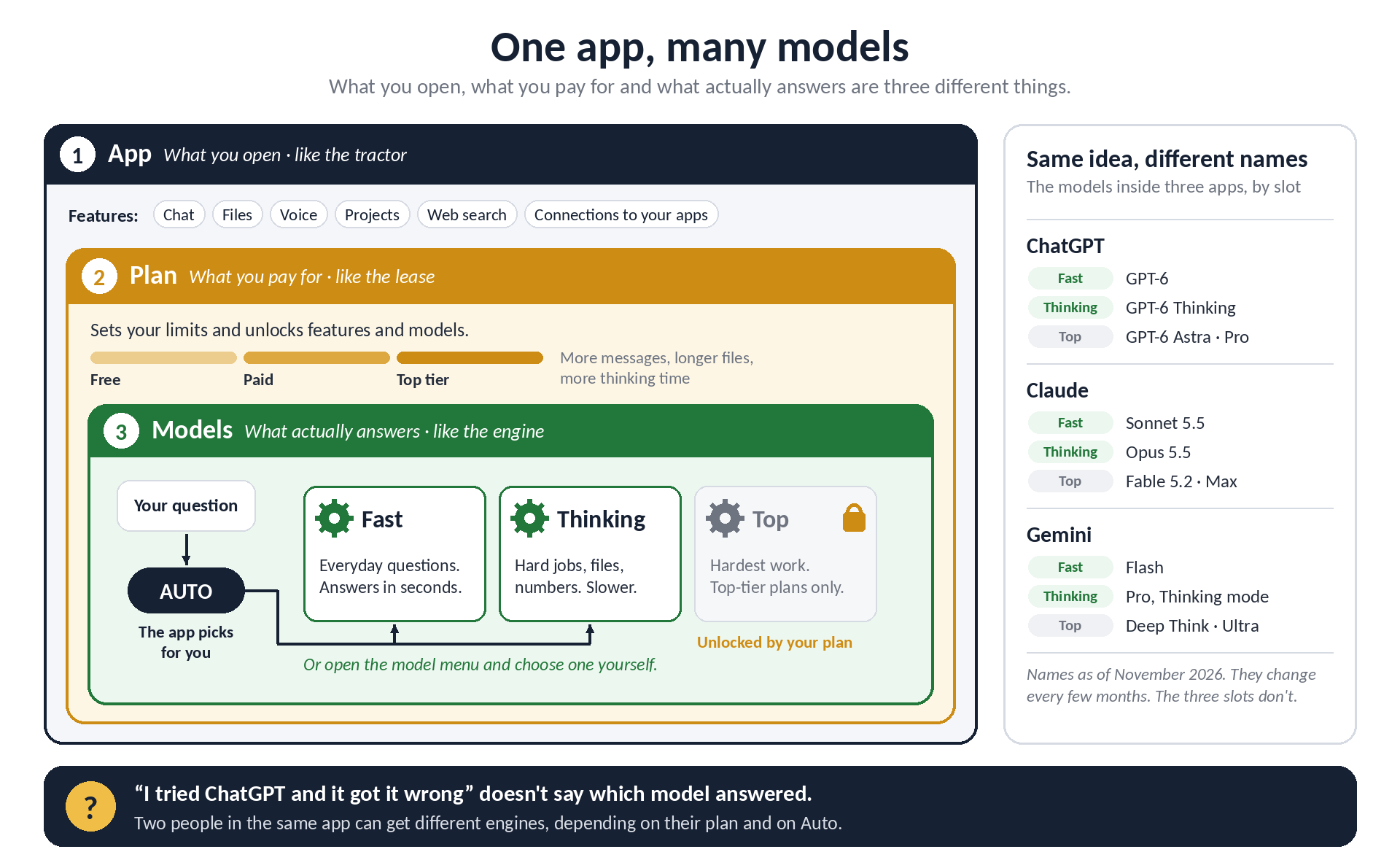
Most apps now pick the model for you. Set to Auto, a short question goes to the fast model and a harder one may go to the thinking model. That’s convenient, but it means two people using the same app can get answers from different engines, depending on their plan and on what Auto decided.
It also explains a common surprise. A free plan that has hit its limit for the day may quietly drop you to a smaller model. The answers get worse, and nothing on screen makes it obvious why.
For most farm work, the top models are already good enough
It’s tempting to chase whichever model topped the latest ranking. To see whether that matters, we used the Epoch Capabilities Index, a public index from the research group Epoch AI. It combines more than 50 benchmarks into one score, so models from different companies and different years can be compared on the same scale.
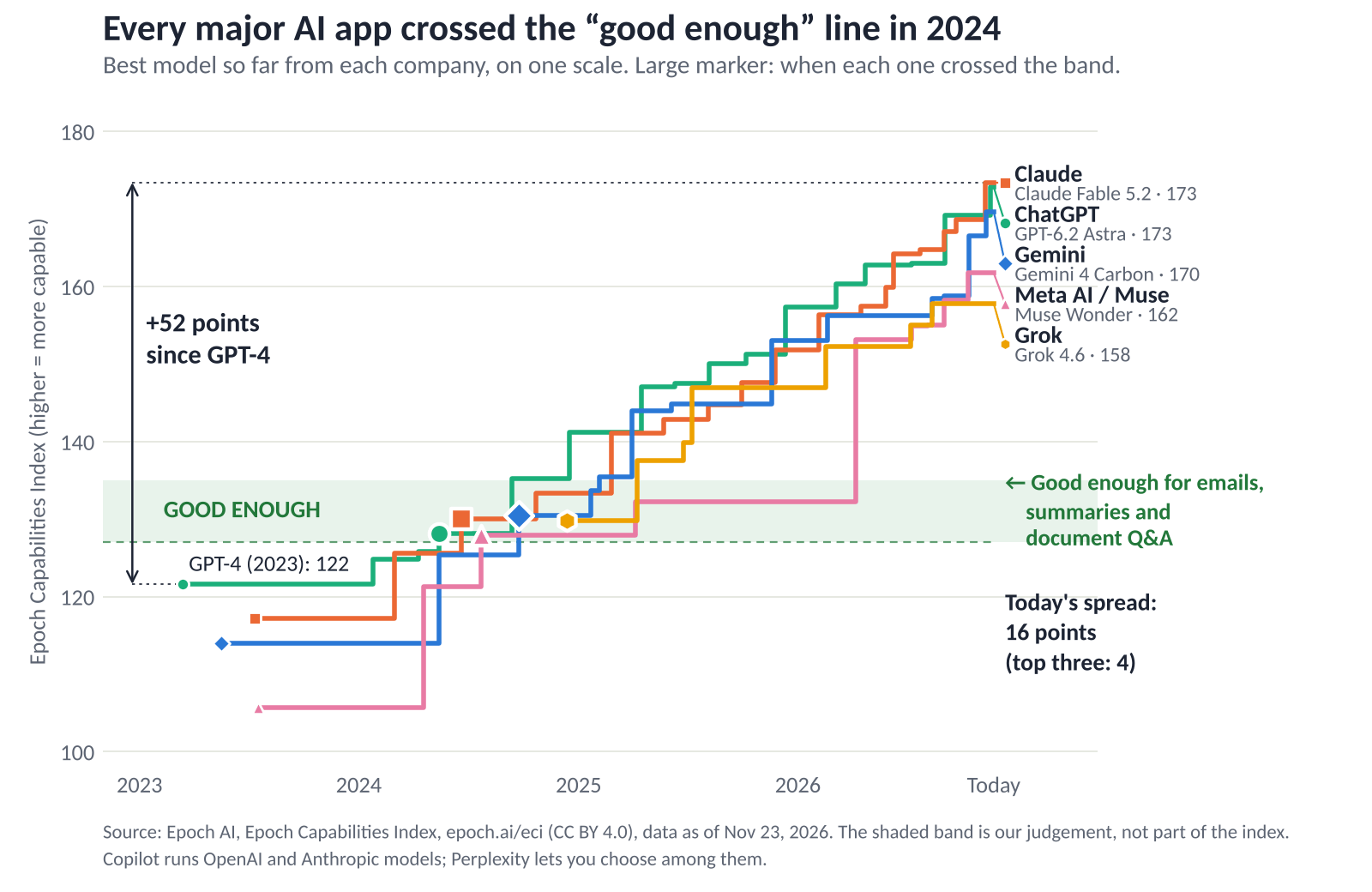
Two things stand out. First, the speed of change. GPT-4 felt like magic in 2023, and on this scale it now sits well below the free models most people use today. Second, the gaps between companies are small next to that climb. The lead changes hands every few months.
The shaded band is our own judgement, set at the level of GPT-4o and Claude 3.5 Sonnet. Those were the 2024 models people first found reliable for writing an email, summarizing a report or answering a question about a PDF. Every major app’s best model passed it during 2024.
For everyday farm-office work, then, the difference between the top apps is rarely the model. It’s everything around it.
Where the top tier still matters
There are exceptions, and they’re the jobs where the gaps above do show:
- Long, multi-step projects, like a grant application, a business plan or a full season plan, where the AI has to hold many pieces together.
- Heavy numbers, such as building a cost-of-production model or checking a large set of field records.
- Hard reasoning, where a wrong step early on spoils everything after it, such as a contract with conditions that depend on each other.
For these, use thinking mode every time, and give it room. This is also the one case where a top-tier plan, at roughly CA$135 to CA$280 a month, can pay for itself.
What actually decides it
If the model isn’t the main difference, what is? These are the factors the picker weighs, in roughly the order they matter.
1. Where your files live
An assistant that already sits next to your files saves the most time, because you stop downloading, uploading and copying.
If your files are mostly paper and phone photos, any of the main apps will read a picture of an invoice or a seed tag, so pick on the other factors.
2. What you’ll share with it
This is about what goes in, not about which company you trust more. We covered it in depth in our two-part privacy guide, but for choosing a plan it comes down to three levels:
- General questions only: any plan works.
- Your own farm’s numbers: any plan where you can switch off training on your chats. ChatGPT, Claude, Gemini, Copilot and Grok all have a setting for this. Meta AI has no simple switch, and Meta has said it uses AI chats to personalize ads.
- Clients’ or staff details: a business plan. These don’t train on your data by default and come with admin controls. They start at CA$18.40 a person for Google Workspace Business Standard, and at about CA$35 for ChatGPT Business or Claude Team.
Where the company is based matters too. All the apps in the picker are American. Some others are not: DeepSeek, for example, is a Chinese company, and the federal government blocked its chatbot on government devices in 2025 over privacy concerns. If you consider an app outside the big names, read where it stores your data before you sign up.
3. Price
Price matters less than you’d think, because most main paid plans cost about the same. The real differences are at the two ends: free plans, and top tiers that cost five to ten times more.
As of November 2026 Monthly, in Canadian dollars, before tax. Prices marked ≈ are converted from US dollars.
| App | Free plan | Main paid plan | Top tier |
|---|---|---|---|
| ChatGPT | Yes, with limits and ads | Plus, CA$25 (Go, CA$11) | Pro, from CA$136 |
| Claude | Yes, with limits | Pro, CA$28 | Max, CA$140 |
| Gemini | Yes, with limits | Google AI Pro, CA$26.99 | Google AI Ultra, CA$279.99 |
| Copilot | Yes, outside Office | Microsoft 365 Premium, ≈CA$28 | Microsoft 365 Pro, ≈CA$139 |
| Perplexity | Yes, with limits | Pro, ≈CA$28 | Max, ≈CA$278 |
| Grok | Yes, with limits | X Premium, ≈CA$42 | Higher X plans, ≈CA$139+ |
Check today’s price before you buy: ChatGPT, Claude, Google AI, Microsoft 365, Perplexity.
A sensible path: start free, and move to one main paid plan when you hit the limits every week. Pay for one plan before you pay for two. And only look at the top tier for the heavy jobs listed above.
4. Speed vs. thinking
Speed isn’t really a separate choice any more. Every main app has a fast mode that answers in seconds and a thinking mode that can take a minute or more. The type of work decides which one you want:
5. Tokens: how much it can read at once
- Token AI’s unit of reading
- A chunk of text, roughly three-quarters of a word (OpenAI). Each model can only hold so many tokens at once, a limit called its context window, and plans limit how many you can use in a day or a week.
You don’t need to count tokens. You just need to recognise the signs that you’ve hit a limit: the AI forgets what you said at the start of a long chat, skips part of a long PDF, or tells you to come back in a few hours. Free plans hit these limits soonest. Paid plans raise them, and some, like Google AI Pro, can hold very long files at once. If long documents are your main work, that’s worth testing in your one-week trial.
6. Specialist apps for specific jobs
Alongside the general apps, there are apps built for one job. They’re worth knowing about, but most people should start with one general app and add a specialist only when a task comes up every week.
- PerplexitySearch with sources. Every answer links to where it came from, and Pro lets you choose between models from several companies.
- Gemini NotebookFormerly NotebookLM. It answers only from the files you give it, the idea behind our post on asking AI about your own documents.
- CursorFor writing code, such as a script that cleans up yield-monitor exports.
- MidjourneyFor images, such as a poster for a field day or graphics for a sales sheet.
The general apps keep adding these features themselves, with web search, image tools and file projects. So a specialist has to be clearly better at its one job to earn a second subscription.
Key takeaways
- App, plan and model are separate choices. Name all three when you compare answers.
- For everyday work, all the top apps are good enough. Every major app crossed that line in 2024.
- Choose on fit: where your files live, what you’ll share, and what you’ll pay.
- Use thinking mode for hard jobs. Pay for the top tier only if those jobs fill your week.
- Run a one-week test on three real tasks before you commit, and keep the one you already use if it’s close.
This list will be out of date by spring
In the past year alone, several of these apps renamed their plans, launched new models and changed their prices. The approach in this post will stay useful longer than any specific pick. Use the picker again whenever your work changes, and check prices on the providers’ own pages before you buy.
This guide is general information, not a product endorsement or financial advice. We don’t earn anything from any link on this page. Prices, plans and model names are as of November 2026.
Frequently asked questions
Which is better for farmers: ChatGPT, Claude or Gemini?
For everyday work, all three are good enough, and their best models are within a few points of each other on public indexes. Choose on fit: Gemini if you live in Gmail and Google Drive, Copilot or ChatGPT if you work in Excel, and Claude or ChatGPT for long documents and big projects. Then test your top two on real tasks.
Is the free version of ChatGPT good enough?
For quick questions and short writing, often yes. Free plans have tighter limits on messages, files and thinking time, may show ads, and may switch you to a smaller model once you hit a limit. If you use it most days, a main paid plan at about CA$25 to CA$28 a month is usually worth it.
Is ChatGPT Plus worth it for a farm business?
If you use AI several times a week for documents, spreadsheets or longer writing, usually yes. The bigger question is which app, not which tier: pick the one that sits next to your files, and turn off training in its settings before you share farm numbers.
Do I need a CA$200-plus AI plan?
Rarely. Top tiers make sense for long, multi-step projects and heavy analysis every week. For emails, summaries and questions about documents, a main paid plan does the job.
What’s the difference between an AI app and an AI model?
The app is what you open, such as ChatGPT or Gemini. The model is the engine that writes the answer. Each app has several models, and your plan decides which ones you can use. Many apps pick the model automatically unless you choose one yourself.
What is a token in AI?
A token is a chunk of text, roughly three-quarters of a word. Models can only read so many tokens at once, and plans limit how many you can use. If an AI forgets the start of a long chat or skips part of a long file, you’ve likely hit that limit.
Want help choosing and setting it up?
In our hands-on workshops, growers, CCAs and farm office teams run the one-week test together on their own tasks, set up the privacy settings, and leave with a setup that fits their work. We also run sessions for co-ops, retailers and consulting teams choosing a business plan for their staff.
Book a workshopSources
- Epoch AI: Epoch Capabilities Index (data as of Nov 23, 2026, CC BY 4.0)
- Epoch AI: ECI frontier trend (Sep 2026)
- Anthropic: Claude plans and pricing
- Kingy AI: ChatGPT, Claude and Gemini prices in Canada (Oct 2026)
- GeoToolbox: ChatGPT pricing (Nov 2026)
- GeoToolbox: Gemini pricing (Nov 2026)
- GeoToolbox: Copilot pricing (Nov 2026)
- Google Workspace pricing (Canada)
- Carly: Perplexity pricing (Jul 2026)
- RoboRhythms: Grok pricing (Oct 2026)
- Meta: About Muse subscriptions
- Meta: Improving your recommendations with AI at Meta (Oct 2025)
- Global News: DeepSeek banned on Canadian government devices (Feb 2025)
- Google: NotebookLM is now Gemini Notebook
- OpenAI: What are tokens?