Two farmers open ChatGPT on the same morning. One types a quick line, gets a generic answer and decides AI doesn’t understand farming. The other spends ten minutes setting the job up and gets a draft that saves a day of paperwork.
Same tool. The difference isn’t a secret prompt. It’s knowing what kind of job you’re handing over, and managing it to match.
Research backs this up. In a Harvard study of 758 BCG consultants, those using AI finished 12.2% more tasks, 25% faster, and their work was rated higher quality. But on a task the AI wasn’t suited for, they were 19% less likely to get it right than people working without it (Harvard Crimson on the Harvard/BCG study). How you use the tool matters as much as the tool.
Most people never learn this, because they use AI the way they use Google. That works fine for quick questions. It falls apart on the jobs where AI could help most: a grant application, next year’s budget, a season of client reports.
This post covers two things:
- How to tell a quick question from a project, and why mixing them up causes most bad results.
- How to manage AI on a project, in five habits, walked through one real farm example.
The short version
- Not every AI task is a quick question. Quick questions get one line. Projects need a brief.
- Most bad AI results start the same way: a project asked like a quick question.
- On a project, manage AI like a new hire. Brief it, check it understood, plan the steps, steer as you go, and keep it in one thread.
- You stay the manager. You approve the plan, check the numbers and make the call.
Part 1: Is it a quick question or a project?
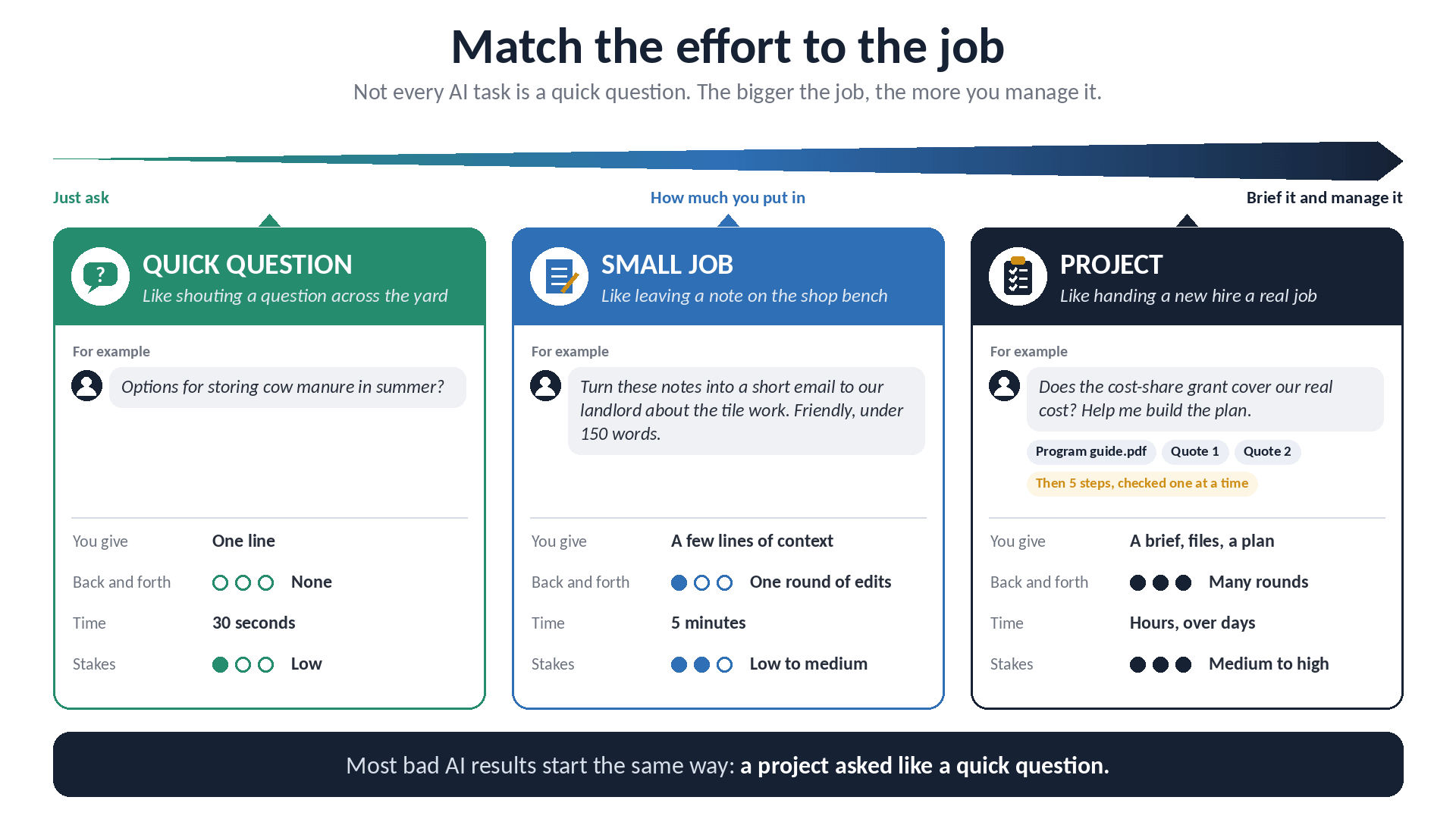
Every job you give AI sits somewhere between a quick question and a full project. Where it sits decides how you should ask.
Three kinds of AI jobs on the farm
| Quick question | Small job | Project | |
|---|---|---|---|
| Grower | “Options for storing manure in summer?” | Turn your notes into an email to the landlord about tile work | Does a cost-share grant cover the real cost of a new practice? |
| CCA | “Which cover crops overwinter in Huron County?” | Turn today’s scouting notes into a client summary | Season-end reports for 12 clients |
| Farm office | “What’s the difference between a T4 and a T4A?” | Sum up three market letters on one page | Pull together the AgriStability file |
| How to ask | One line, with web search on | A few lines of context, one round of edits | A brief, your files, a plan, and your review at each step |
A quick question needs a clear line and nothing more. Turn web search on so it checks current sources. Don’t overthink it.
A small job needs a few lines: who it’s for, how long, what tone. Expect one round of edits.
A project is different. It’s real work, and it needs the same handover you’d give a new employee.
Four signs you’re holding a project
- Many inputs: several files, numbers or people.
- Several steps: step 3 depends on getting step 1 right.
- Real stakes: money, compliance or a client relies on the result. See the trust ladder.
- It runs over days: you’ll come back to it more than once.
If two or more apply, treat it as a project.
The costly mistake: a project asked like a quick question
Here’s a project typed like a Google search:
A typical answer (illustrative):
It sounds helpful. But it doesn’t say which program or intake it means, and it cites no page. It says nothing about the costs a grant doesn’t cover: your own labour, the termination pass, the learning curve. It doesn’t mention that cost-share payments count as taxable income (OSCIA cost-share programs).
The AI didn’t fail. It answered the question it was asked. The job needed a manager.
Quick questions and small jobs mostly take care of themselves. Projects are where the payoff is, and where most people get stuck. The rest of this post is about projects.
Part 2: Manage it like a new hire. Five habits for AI projects
You wouldn’t hand a new employee a 30-page binder and say “figure it out.” You’d brief them, check they got it, agree on a plan, look in on the work, and keep everything in one place. Managing AI on a project works the same way.
The example we’ll follow
A 600-acre cash-crop farm in Perth County grows corn, soybeans and wheat. It’s weighing a multi-species cover crop after wheat on about 200 acres, plus an air seeder kit, to qualify for a cost-share intake. The program says “50% cost-share.” The real question: does it cover half the true cost?
The files are the program guide (a 30-page PDF), a seed quote, a seeder kit quote and a field list. The same approach works for a dairy weighing a methane-reducing feed additive, a vegetable grower upgrading irrigation, or a CCA writing season-end reports. Numbers below are illustrative.
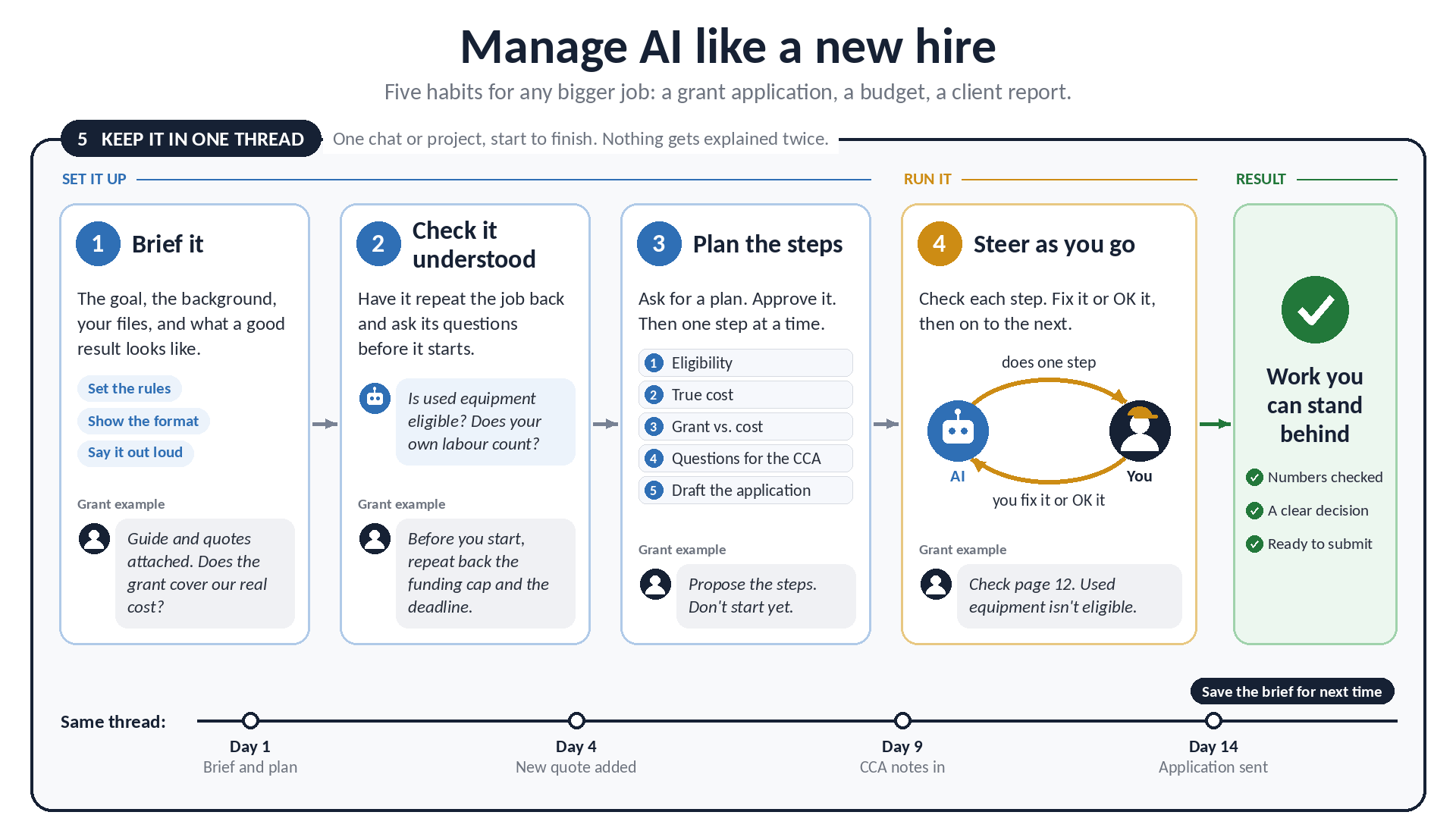
Habit 1: Brief it
Give it the goal, the background, your files and what a good result looks like. Set your rules up front, and show the format you want back.
I farm 600 acres of corn, soybeans and wheat in Perth County, Ontario. We’re considering a multi-species cover crop after wheat on about 200 acres, plus an air seeder kit, and want to apply for cost-share. Attached: the program guide, two quotes and our field list.
Goal: tell me if the grant covers our true cost, then help me build the plan and the application.
Rules: use only the attached guide for eligibility, and quote the page. Flag missing information; don’t assume. Acres and $CAD.
Format: lay out the budget like this: Item | Total cost | Grant coverage | Net farm cost.
Pointing it at your own files is what stops the guessing. See how to make AI answer from your farm documents.
Tip: a long brief is faster said than typed. Use voice typing on your phone and talk it through from the truck. See voice from the cab.
Habit 2: Check it understood before it starts
Before any real work, have it repeat the job back and ask what it needs.
It answers with page numbers, then asks:
- “Is the seeder kit new or used? Page 12 covers new equipment only.”
- “Should I count your own labour as a cost?”
- “Which fields are in?”
A wrong assumption caught here costs a minute. Caught at step 5, it costs an hour.
Habit 3: Plan, then one step at a time
Ask for a plan, approve it, then work through it one step at a time. Don’t let it do the whole job in one go.
| Step | The job | Your part |
|---|---|---|
| 1 | Eligibility check, with page numbers | Check the pages |
| 2 | True cost, including hidden costs | Fill in the gaps |
| 3 | Grant vs. out-of-pocket table | Check every number |
| 4 | Questions for the CCA | Your CCA decides |
| 5 | Project plan and draft application | Edit and submit |
Small steps are easy to check. A long answer that’s wrong on page 2 is wrong on every page after it. Step 4 is where AI stops: it lists the questions, and your CCA decides whether the mix suits your clay loam ahead of corn.
Habit 4: Steer as you go
Review each step before moving on. When it slips, correct it in one line. Slips are normal. They’re part of managing, not a sign the tool is broken.
| If it… | Type this |
|---|---|
| Writes too much | “Cut the project description to 150 words. That’s the form limit.” |
| Drifts off the step | “Stop. We’re only on step 1: eligibility.” |
| Jumps ahead | “Just the plan for now. Wait for my OK.” |
| Gives a number with no source | “Where did that number come from? Show me the page.” |
| Forgets what you told it | “The kit is used, so it’s not eligible. Redo the table.” |
| Keeps polishing | “Good enough. Move on to step 3.” |
| Sounds wrong for the reader | “Plainer. Write it like a farmer explaining his own project.” |
Two more manager moves:
- Ask how it got there. “How did you get $38 an acre for seed?” You see the math, and you learn how it works.
- Test it now and then. “What’s the funding cap again?” If it’s wrong, fix it before it builds on the mistake. See make it show its work.
Habit 5: Keep it in one thread
Keep the whole job in one chat, or in a project folder that holds the files and chats together (Projects in ChatGPT). Context builds like compound interest. On Day 4 the second quote arrives: you upload it and carry on, with nothing to re-explain. On Day 9 the CCA’s notes go in, and on Day 14 the application goes out.
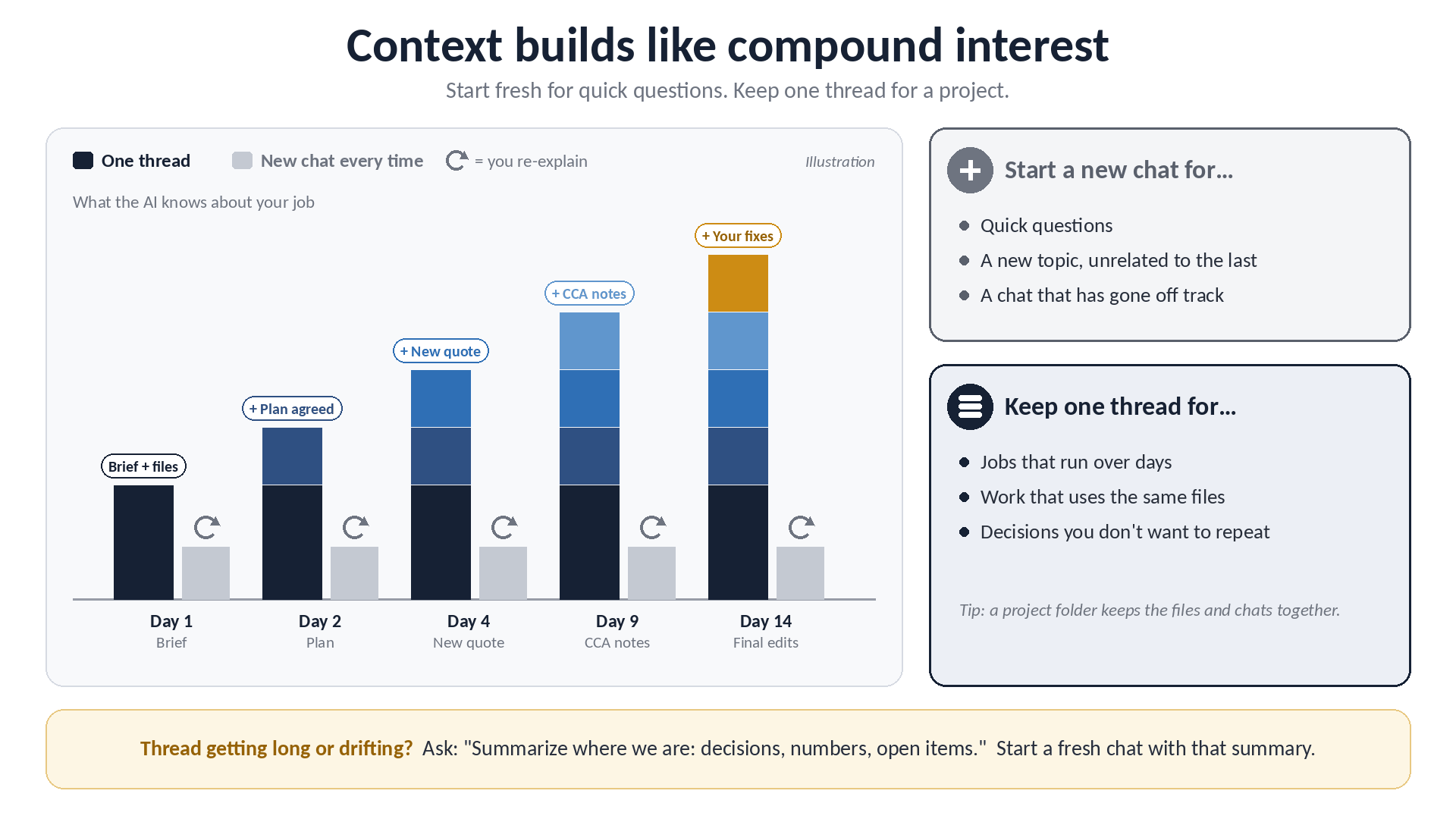
For quick questions and unrelated topics, start a new chat, so old context doesn’t muddle the answer.
One caveat: in a very long chat, AI can lose track of details buried in the middle, a weakness researchers have measured (Lost in the Middle, Liu et al., 2023). When a thread gets long or starts drifting, ask: “Summarize where we are: decisions, numbers, open items.” Paste that summary into a fresh chat in the same project.
Save the brief. Once a brief works, keep it. At the next intake, or for your neighbour’s application, you start at habit 2. See reusable AI assistants for the farm.
What came out of it
Once own labour, the termination pass, three years of seed and tax were counted, the “50% grant” covered about 35% of the true cost (illustrative). The farm started on 120 acres instead of 200 and sent a cleaner application a week before the deadline.
The AI did hours of reading and math. Every decision stayed with the farmer and the CCA.
Key takeaways
- Match the effort to the job. A quick question gets one line. A project gets a brief.
- Most bad AI results are projects asked like quick questions. If a job has many inputs, several steps, real stakes or runs over days, treat it as a project.
- On a project, keep the manager hat on. Brief it, check it understood, plan the steps, steer as you go, and keep it in one thread.
- AI does the reading and the math. You make the calls.
Copy this brief
Start any AI project with this, then follow habits 2 to 5.
I farm [crops, acres] in [county], Ontario. I’m working on [the job].
Attached: [your files].
Goal: [what you want to end up with].
A good result looks like: [length, format, who it’s for].
Rules: use only the attached files for facts, and quote the page. Flag missing information; don’t assume. Ontario units and $CAD.
Before you start, repeat the job back to me and ask what you need. Then propose a plan and wait for my OK.
Frequently asked questions
What’s a good ChatGPT prompt for farmers?
For a quick question, one clear line is enough. For a bigger job, a good prompt is a brief: who you are, the goal, your files, your rules and the format you want. Use the template above.
Do I need to learn prompt engineering?
No. If you can brief a new employee, you can brief AI. The five habits matter more than any special wording.
Should I start a new chat every time?
For quick, unrelated questions, yes. For a job that runs over days, keep one thread or project so the AI keeps your files and decisions. If the thread gets long, carry a summary into a fresh chat.
Can AI fill out my grant application?
It can read the guide, check eligibility, build the budget and draft the text far faster than you can. You check every number against the current guide, and you sign and submit. Program rules change between intakes, so always work from the latest guide.
Want help running your first AI project?
In our hands-on workshops, growers, CCAs and farm office teams bring a real job, like a grant application or a season of client reports, and work through it with the five habits. You leave with a brief that works and a finished first draft. We also build custom training for co-ops, retailers and consulting teams.
Book a workshopSources
- Harvard Crimson: Harvard/BCG study on AI and consultant performance (Oct 2023)
- Dell’Acqua et al., Navigating the Jagged Technological Frontier (working paper PDF)
- OSCIA: cost-share programs (eligibility by program guide; cost-share payments are taxable)
- OpenAI Help: Projects in ChatGPT
- Liu et al., Lost in the Middle: How Language Models Use Long Contexts (arXiv, 2023)