In Part 1, we saw why privacy works differently with AI. It listens like a person, remembers, connects the dots and keeps what you say. Most of the risk isn’t one big secret. It’s many small, harmless-looking details that add up to a profile, and chats that can travel further than you’d expect.
That’s the why. This part is the how, and the good news is that it’s mostly simple.
Protection comes in two layers. You need both. The best settings can’t take back what you typed, and careful typing doesn’t help if your chats are being saved and joined up for years.
The goal isn’t to share nothing. AI needs context to be useful. The goal is the rule from Part 1: share your situation, not your identity.
The short version
- Four settings matter: training, memory, history and connected apps. They don’t carry equal risk. Connected apps carry the most, training the least.
- The quickest win: use a temporary chat for anything personal. It turns down three dials at once.
- Six habits for what you type: cut what isn’t needed, round the details, ask about options, use roles instead of names, clean your files, and keep sensitive topics apart.
- Ten minutes is enough to check your settings. There’s a checklist at the end.
Layer 1: set the four privacy dials
Most people think “privacy setting” means one switch. There are four, and each one answers a different question.
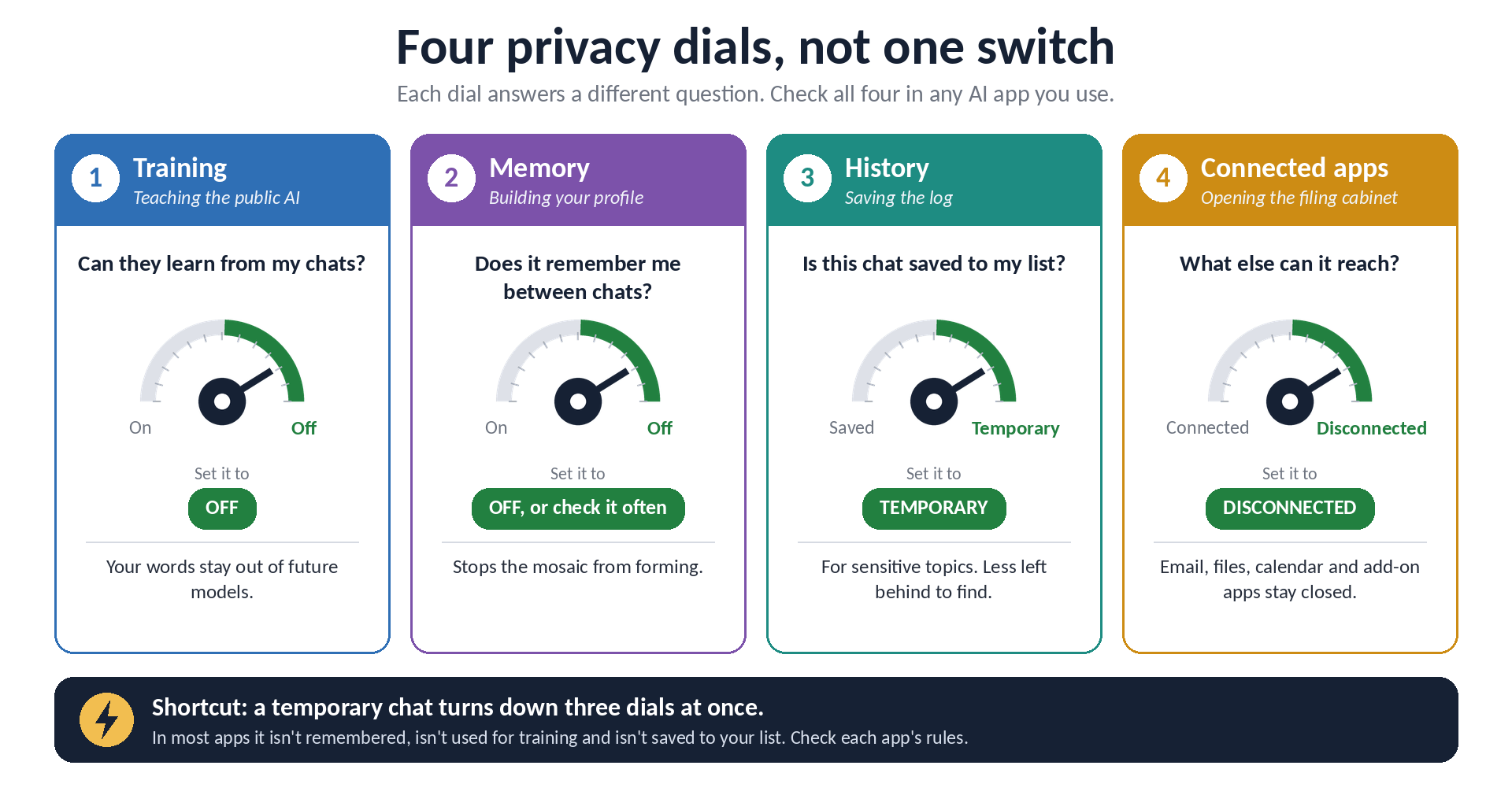
The goal isn’t to turn everything off. Some of these features are genuinely useful: memory saves retyping, and history lets you pick up a long job where you left off (see keeping a project in one thread). The goal is to know what each dial risks, and set it on purpose.
Not all dials carry the same risk
Connected apps
Whether AI can read your email, files, calendar or other apps
Our take: keep disconnected. Connect one app for one job, then disconnect.
Memory
Whether AI remembers facts about you across chats
Our take: off, or check it often and delete what you don’t want kept.
History
Whether chats are saved to your list
Our take: keep it for work projects. Use a temporary chat for anything sensitive.
Training
Whether your chats help improve future models
Our take: off if you prefer. It’s easy, and it costs you nothing.
Connected apps carry the most risk because they reach far beyond what you typed. A connected inbox holds the email thread with your lender. A connected Drive holds the folder with last year’s tax return, and files you’ve forgotten are there. Add-on apps bring their own privacy rules on top. And once access is granted, it’s easy to forget it’s still on.
Memory comes next, because it’s what turns separate chats into the mosaic from Part 1. Every fact it saves is a piece of the picture.
History is in the middle. Saved chats are handy for real projects, but the more you keep, the more there is to leak, to be read by a reviewer, or to be handed over in a legal case.
Training is lower than most people think. Your words become a tiny part of a very large pile of text used to improve future models, and they’re unlikely to be traced back to you. Some samples may be read by people, though, and turning training off is easy.
Connected apps: read before you tap
AI apps are keen for you to connect your email, calendar and files, and the design of the prompts shows it.
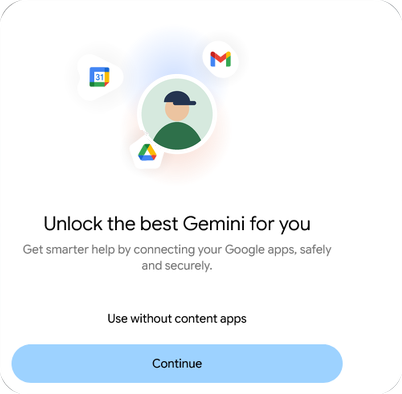
If you do connect an app, do it for a specific job, check what access you’re granting, and disconnect when the job is done.
The shortcut: temporary chats
It isn’t a perfect vanishing act. Companies may keep a copy for a short time for safety reasons: up to 30 days for ChatGPT (OpenAI Temporary Chat FAQ). But it’s the single easiest habit on this list. Use it for anything about your health, your money or your family, and anything you’d hesitate to put in an email.
Where to find the settings in ChatGPT, Gemini and Claude
As of November 2026 Menu names change often, so check each company’s help pages if something has moved.
| Dial | ChatGPT | Gemini | Claude |
|---|---|---|---|
| Training | Settings, then “Improve the model for everyone” | Turn off “Keep Activity.” This also stops saving your chat history; chats are still kept 72 hours | Settings, Privacy, “Model Improvement.” If on, chats can be kept up to 5 years for training |
| Memory | Settings, Personalization, Memory. “Manage” shows what it has saved | Settings for past chats and personal context. Ask “What do you know about me?” | Settings, then Memory. Pause it, or reset to delete everything |
| Temporary chat | Temporary Chat: not in history, no memory, not used for training. A copy may be kept 30 days for safety | Temporary chat: not used for training | Incognito chat: not saved, not remembered, not used for training even if Model Improvement is on |
| Connected apps | Settings, Apps | Settings, Connected apps | Settings, Connectors |
| Also check | Shared links (Data controls) and ad personalization on Free and Go plans | Human review: reviewed chats kept up to 3 years | Feedback (thumbs up or down) is kept for 5 years |
Sources: OpenAI Temporary Chat FAQ, PCWorld on ChatGPT settings, Gemini Apps privacy hub, Claude model improvement, Claude memory.
Business accounts vs. personal accounts
Business plans are usually more private by default. OpenAI, for example, says it doesn’t train on business data unless the organization opts in (OpenAI business data). Claude and Gemini’s work plans run under separate business terms too.
The trade-off: on a work account, your organization sets the rules and may be able to see your chats. So keep work on the work account, personal life on a personal one, and client data off free personal accounts.
| Personal account | Business account | |
|---|---|---|
| Used for training by default | Often, unless you turn it off | Usually not |
| Who sets the rules | You | Your organization |
| Best for | Your own questions, with care | Work and client data |
Using another AI app? Do your own homework
We’ve used ChatGPT, Gemini and Claude as examples. Meta AI, Microsoft Copilot, Grok, DeepSeek and the farm apps built on top of them all have their own rules. Meta’s new Muse Spark model, for example, is tied to your Meta identity, and Meta’s AI terms say your chats are used to personalize your experience and ads (R&D World on Muse Spark).
Before you trust any AI app with something personal, find the answers to five questions:
- Does it train on my chats, and can I turn that off?
- Does it remember me, and can I see and delete what it remembers?
- How long does it keep my chats?
- Is it linked to my other accounts, like social media or email?
- Who actually stores my data: this app, or the AI company behind it?
If you can’t find the answers in a few minutes, treat the app as orange at best: fine for general questions, not for anything about you.
Layer 2: watch what you type
Settings control what happens after you hit enter. Your habits control what goes in. AI needs context to be useful, so the aim isn’t to say less. It’s to give AI your situation without giving it your identity.
Each habit below comes with a real-world before and after.
1. Ask: does it need this?
Read your prompt one sentence at a time. If a sentence doesn’t change the answer, cut it. Backstory and venting are the usual suspects. It’s not that feelings don’t matter. It’s that AI doesn’t need them to answer this question.
I’m 63 and my knee surgery is in October, and honestly I’m worn out and not sure how much longer I can keep this up. My wife and I argued about it again last night. One of our two kids wants to take over the farm and one doesn’t. How do we hand the farm over fairly to both?
One of our two kids wants to take over the farm and one doesn’t. How do we hand the farm over fairly to both, and what should we talk through as a family first?
If you’re using AI to talk through stress, use a temporary chat. And remember there are people who understand farm life and want to listen (Do More Agriculture Foundation).
2. Round the details
AI rarely needs exact numbers or places to give good advice. A number on its own says little about you. A number plus a town plus a family situation starts to.
I farm 612 acres near Mitchell, 410 owned and 202 rented at $285 an acre. Our operating loan is $412,000 at 7.2%. Should I pay down part of the loan this winter or keep the cash for a land purchase?
I farm about 600 acres in southwestern Ontario, roughly two-thirds owned, with rented land at around $280 to $300 an acre. We carry an operating loan of about $400k at around 7%. Should I pay down part of the loan this winter or keep the cash for a land purchase?
If the math needs an exact number, give the number but leave out the place and the names.
3. Ask about options, not your situation
Instead of telling AI where you stand, ask it to compare the paths. You get the same analysis without stating your own position.
We’re behind on our operating loan and the bank has called twice. The landlord wants $40 more an acre on the 200 acres we rent from him. I don’t want the neighbours to find out we’re struggling. Should we give it up?
For a farm with tight cash flow, compare two options: keep about 200 rented acres at a $40-an-acre increase, or let them go. What should we weigh, and what numbers should I run before deciding?
4. Use roles and placeholders, not names
Names are what turn a situation into a person. Swap them for roles, letters or field codes.
Jake wants to farm but Emma doesn’t, and Emma is worried she’ll be left out of the estate. How do we keep it fair?
Child A wants to farm and Child B doesn’t, and Child B is worried about being left out of the estate. How do we keep it fair?
For CCAs and farm office staff:
Write fertility recommendations for John Smith’s back 80 on Concession 6, Perth East. He’s had a rough year since the divorce, so keep it gentle.
Write fertility recommendations for Client A, Field 3 (clay loam, corn after soybeans). Keep the tone friendly and simple. I’ll add the name before sending.
Asking “for a friend” can help too, but the details of the question still describe you, so pair it with habit 2.
5. Clean your files before you upload
Files often carry more than you meant to share. The fix takes a minute.
What to look for:
- PDFs and spreadsheets: names, addresses, lot numbers, account numbers. Remove them, or crop to the part you need.
- Photos: farm signs, faces, licence plates, and location data stored in the photo itself. Most phones can drop the location when you share a photo, usually in the share options. A screenshot of the photo usually leaves the location behind too.
- Screenshots: names and numbers in the corners.
- Voice notes: other people talking in the background.
Farm document scrubber: coming soon
See also: what’s safe to upload, the traffic light from our post on farm documents.
6. Keep sensitive topics apart
The mosaic forms when the pieces sit in one place. Keep them apart and there’s nothing to join.
Before: one chat Memory on
After: three temporary chats Temporary
Ask about your health, your money and your family in separate temporary chats, and they can’t be connected. That’s the simplest defence against profiling there is.
Your ten-minute privacy checklist
Do this once in each AI app you use, then again every few months.
Key takeaways
- Two layers: settings control what happens after you hit enter; habits control what goes in. You need both.
- Four dials, different weights. Connected apps carry the most risk, then memory, then history, then training. Set each one on purpose.
- Temporary chats are the quickest win for anything personal.
- Six habits: cut what isn’t needed, round the details, ask about options, use roles, clean your files, keep sensitive topics apart.
- The rule: share your situation, not your identity. You keep nearly all of the benefit.
This changes fast, so keep checking
In the past two years, AI companies have added memory, ads, new apps and new settings, and renamed menus more than once. Courts and privacy regulators are still catching up. Check your settings every few months, and whenever an app announces something new. In Canada, the Office of the Privacy Commissioner is a good place to watch (Office of the Privacy Commissioner of Canada).
This guide is practical advice, not legal advice. It isn’t a complete review of any company’s privacy policy, and the settings described are as of November 2026. For legal questions, or obligations around client data, talk to a lawyer or your professional association.
Frequently asked questions
How do I stop ChatGPT from training on my chats?
In Settings, turn off “Improve the model for everyone.” Temporary chats aren’t used for training either, and OpenAI says it doesn’t train on business plans by default.
Is a temporary chat completely private?
Not completely. It isn’t saved to your history, remembered or used for training, but companies may keep a copy for a short time: up to 30 days for ChatGPT, according to OpenAI.
Should I turn off AI memory?
Not necessarily. Memory is useful for ongoing work. But it’s also what builds a profile over time, so either turn it off or check what it has saved every month or two, and use temporary chats for anything personal.
Is it safe to connect Gmail or Google Drive to AI?
It’s the highest-risk setting, because the AI can then reach far more than you typed. Connect only for a specific job, check what access you’re granting, and disconnect when you’re done.
How do I anonymize an AI prompt?
Cut details that don’t change the answer, round numbers and places, ask about options instead of your own situation, swap names for roles like “Child A” or “Client A,” and clean names and locations out of any files.
Are business AI accounts more private?
Usually, by default: business plans generally aren’t used for training. But your organization controls the account and may be able to see your chats, so keep personal matters on a personal account.
Want help setting this up?
In our hands-on workshops, growers, CCAs and farm office teams set the four dials together, practise rewriting real prompts, and leave with a one-page privacy checklist. We also build custom AI privacy training for co-ops, retailers and consulting teams handling client data.
Book a workshopSources
- OpenAI: Temporary Chat FAQ
- PCWorld: ChatGPT settings to change (Aug 2026)
- Gemini Apps privacy hub (Google)
- Anthropic: How Claude uses data for model improvement (Jul 2026)
- Anthropic: Claude chat search and memory
- OpenAI: Business data privacy
- R&D World: Meta’s Muse Spark and user data (Apr 2026)
- The Do More Agriculture Foundation
- Office of the Privacy Commissioner of Canada